Showing posts with label webobjects. Show all posts

Monday, October 11, 2021

WebObjects and NeXT on Dell? It almost happened...

 Read over at CNet how Steve Jobs tried to convince Michael Dell to use NeXT on PCs: 

Fast forward to 1993. Jobs, ousted from Apple after a fallout with the company's board in 1985, had started a new company, called Next, and created a beautiful (but expensive) workstation, with its own operating system, as well as software called WebObjects for building web-based applications. Dell says Jobs came to his house in Texas several times that year, trying to convince him to use the Next operating system on Dell PCs, by arguing that it was better than Microsoft's Windows software and could undermine the Unix workstation market being touted by Sun Microsystems. The problem, Dell says he told Jobs, was that there were no applications for it and zero customer interest. Still, Dell's company worked a little bit with Next and used WebObjects to build its first online store in the mid-'90s. 

In 1997, Jobs rejoined a struggling Apple after it acquired Next for $429 million, and he pitched Dell on another business proposal (as Jobs was evaluating Apple's Mac clone licensing project, which he ultimately shut down). Jobs and his team had ported the Mac software, based on Next's Mach operating system, and had it running on the Intel x86 chips that powered Dell PCs. Jobs offered to license the Mac OS to Dell, telling him he could give PC buyers a choice of Apple's software or Microsoft's Windows OS installed on their machine. "He said, look at this -- we've got this Dell desktop and it's running Mac OS," Dell tells me. "Why don't you license the Mac OS?" Dell thought it was a great idea and told Jobs he'd pay a licensing fee for every PC sold with the Mac OS. But Jobs had a counteroffer: He was worried that licensing scheme might undermine Apple's own Mac computer sales because Dell computers were less costly. Instead, Dell says, Jobs suggested he just load the Mac OS alongside Windows on every Dell PC and let customers decide which software to use -- and then pay Apple for every Dell PC sold. 

Dell smiles when he tells the story. "The royalty he was talking about would amount to hundreds of millions of dollars, and the math just didn't work, because most of our customers, especially larger business customers, didn't really want the Mac operating system," he writes. "Steve's proposal would have been interesting if it was just us saying, "OK, we'll pay you every time we use the Mac OS" -- but to pay him for every time we didn't use it ... well, nice try, Steve!" Another problem: Jobs wouldn't guarantee access to the Mac OS three, four or five years later "even on the same bad terms." That could leave customers who were using Mac OS out of luck as the software evolved, leaving Dell Inc. no way to ensure it could support those users. Still, Dell acknowledges the deal was a what-could-have-been moment in history. [...] That different direction led to Jobs continuing to evolve the Next-inspired Mac OS and retooling the Mac product line, including adding the candy-colored iMac in mid-1998. 

Friday, March 8, 2019

Oracle Java Copyright is Dangerous to the Developer Community

The US Supreme Court has been urged to hear Google out in its long-running copyright battle with Oracle over the search giant’s use of Java technology in Android. A number of amicus briefs have been filed with the top court in support of Google, with Microsoft, Red Hat and Mozilla, along with the Python Software Foundation, Developers Alliance, and the EFF, backing the web titan against database-slinger Oracle.

These recount an earlier court ruling in Oracle's favor on the fair use of Java APIs – stating, as it stands, that it sets a dangerous precedent that breaks long-standing and well-understood rules on software development, risks confusing the community and will damage innovation.

Google insists it built the Android platform on the computer industry’s “long-accepted practice of re-using software interfaces” – and that Oracle is "trying to profit by changing the rules of software development after the fact."

The Developers Alliance also sought to emphasize the knock-on effects of the decisions. “The current case has implications that go far beyond the two litigants involved,” as written in this PDF...

Wednesday, April 1, 2015

Ask Your Developer: Is this a Web or Cloud App?

When a customer asks, should we go Cloud vs Web, my response is frequently, what's the difference? Then, I try to illuminate with the following. These days cloud applications are all the rage… but what’s the difference between a cloud app and a web app, if they both run in your browser? And are mobile apps cloud-only? Confused? Don’t be. Here’s a quick primer on the differences (and similarities).

Let’s start with web applications — software accessed over a network such as the internet or an intranet via a web browser such as Safari or Chrome. Such tools are built with= a browser-based language (e.g. JavaScript), displayed with HTML and accessed with a common web browser. In web apps, the software as well as the database resides on a central server. This saves software developers from building and maintaining multiple client versions for a specific operating systems.

Cloud apps are hosted by cloud providers (Amazon, Google, others) and are accessed over the Internet. The software-as-a-service (SaaS) provider owns the software while the customers “rent the app” in a pay per use model. As web apps, they are used through a web browser so nothing needs to be installed locally. Cloud apps are generally architected to support multi-tenancy — enabling multiple customers (tenants) to be aggregated into the same application). Pricing is based on actual usage or per-user.

They seem similar, don’t they? Both types of apps are stored on a server and delivered through a browser interface over the internet. Cloud apps should have high availability (through mirrored installations in multiple locations) as a feature, while many web apps are limited in ability to support a fixed number of users. Cloud apps may offer extra security and integration with other systems via web services. Administrators of cloud apps can easily configure workload and traffic patterns in order to utilize the exact amount of infrastructure offered. Web applications are usually developed for a given platform, limiting scalability.

Mobile apps that access the same back-end over the internet would be considered cloud apps if the architecture and supporting infrastructure are cloud-based.

Tuesday, February 25, 2014

The Difference Between Websites and Web Apps

This is a good article to provide to consumers on the difference between the World Wide Web and, well, web apps.

The confusion comes from the fact that a web application, or any type of app performs some useful function. You interact with it somehow to complete some job that you need done. But now when most people hear the word app, they recall hearing the catchy phrase there's an app for that and associate that with their phone. Apps then become something that is on their phone.

TenPixesl wraps up with this bit of advice,

The train of thought required to build a web app is quite different than a web site. When building a web site, some common questions might be what information do I want to display, and what's the best way to display it? When building a web application, the questions become features. A developer will ask what does this app need to do? What are we trying to accomplish.

Monday, February 10, 2014

Planning an Online Presence? Here's Some Tips

First question: "Why am I building this web site?" Are you building the site to make money? To share information? Or to build community, to keep in touch, or other collaborative effort?

If you are planning a commercial venture, consider tips on business planning, such as this magazine article.

The most basic tool to get started, after your business plan, would be a site map.

A site map is a diagram that represents the hierarchical structure of your site. The site will ultimately be rendered in Hypertext Markup Language (HTM), but this blueprint provides guidance on the overall navigation and structure.

To get started creating a "site map" of what you envision, read this...

You can use a tool such as this, http://slickplan.com/ or http://www.gliffy.com/ 

A site map is a planning aid that maps out the pages and navigation/structure, to help organize and categorize you content so that visitors can achieve the end goal of viewing your site.

Of course, you could also just use paper and pencil, which lets you free-think with little up-front learning.

Once you'd got your business plan and site map, you should decide if your site can be static (just HTML files) or dynamic (frequent content updates or interactivity, requiring more sophisticated technology such as a content management system (CMS) or actual computer code.

If you have relatively static (unchanging) content, the old method of updating an HTML file manually and uploading it to a server may suffice. This low-tech, low-cost approach can get a site launched fairly quickly.

if your content needs to be able to be updated regularly (daily, weekly, ad hoc), with different people adding content, or content that is updated automatically through the use of automated tools, a CMS might be the way to go.

Another advantage of a CMS -- no need to master HTML. In many organizations, content authors rely on web developers to put the mark-up formatting codes in place to make content web-ready. With a CMS, the content author/owner can access the parts of the site specific to their own content, and publish, often directly to the web site. Sometimes workflow is used, to enable third-party review and approval.

Finally, a CMS makes applying design standards more simple. With static pages, there is great flexibility, but one often relies on templates to ensure a consistent look across a site. With a CMS, non-authorized users cannot make changes to controlled areas.
-

Monday, January 6, 2014

"You keep using that word. I do not think it means what you think it means"

In keeping with what a great swordsman once uttered, using that word wrong doesn't make your web service work better. The Application Programming Interface (API) in Service Oriented Architecture (SOA) is a new catch phrase, we hear. This so-called 'REST API' is almost always just an 'HTTP interface' given a fancy name to make it sound better, more so than the integration strategy many consultants are offering up. In an organization with an e-commerce or web development team, this "programmer" view makes SOA seem cool.

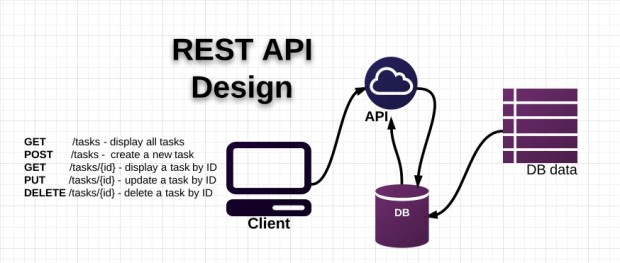
REST stands for Representational State Transfer, as proposed in a doctorate dissertation. This approach uses the four HTTP methods GET, POST, PUT and DELETE to execute different operations, compared to SOAP, which creates new arbitrary commands (verbs) like getAccounts() or applyDiscount(). Thus, a REST API is a set of operations that can be invoked by means of any the four verbs, using the actual URI as parameters for a web service operation. For example, we might have a method to query all case management accounts which can be called from /accounts/all/ to invoke a HTTP GET and the 'all' parameter. This tell the web service that to return all accounts, probably in an XML stream annotated for the particular client (with CSS, for example, for a browser).

Here at Bluedog, our apps have always been built with the web tier against the same set of "APIs" as the mobile tier. The advantage of a Java/WebObjects framework is "out-of-the-box" support for a variety of clients. The Ajax framework in Project Wonder provides many of the features that Rails users have come to expect, but written in a style that fits well with "The WebObjects Way" of doing things. An attempt is made to avoid writing javascript whenever feasible, as well as providing as much support for component actions as possible.

The majority of Ajax framework is written without dependencies on ERExtensions (the core framework in Project Wonder). This means that for most Ajax capabilities (the JavaScript/CSS components that give sizzle to the browser), we can use a framework without making a Web Service or Application extend any classes. Advanced capabilities can be designed using supporting classes that are available in the ERExtensions framework or by extending the open source classes such as ERXSession in our foundation frameworks.


The rise of mobile has harkened back the older client/server model which emphasized rich client interfaces, first made popular with Swing and other attempts at native Java clients. With our "API-first" development model, the Java/WebObjects tier is the interface to the device -- or client. When you put a desktop browser client, mobile native app (Objective C for iPhone or iPad) or a desktop app in front of the app server you make a mobile-enabled stack is simple. And all is right, in the world of SOA.

Tuesday, October 29, 2013

Unsecured Data Communication at the Health Care Exchange? Shouldda gone with My TRA


In May of 2011, I presented a back-end web services architecture for U.D. Dept of Health and Human Services Center for Medicaid & Medicare to the CTO (Mark Hogle). If the contractors for the public portal had gone with the technical reference architecture (TRA) as it was written and approved by the CTO, the concerns regarding back-end data in-transit, unsecured, would not be warranted.

Specifically, the reference architecture I developed called for,

Where the highest level of practical protection is called for, encrypting all message fields should be included in the architecture. XML Encryption (and decryption) requires fully parsing the XML transaction and then, for select message section(s), performing a set of processing-intensive XML and cryptographic encryption (decryption) operations. Deploying both XML Encryption and XML digital signatures can significantly affect the performance of high-transaction applications due to their resource-intensive nature. This can be mitigated by using hardware (an appliance, for example) rather than a software-based solution.


What are the implications of ignoring this (common-sense?) policy? Typically, a man-in-the-middle attack could be orchestrated. This breach is a form of active eavesdropping by which the attacker makes independent connections with the targets and relays messages between them, making them believe that they are talking directly to each other over a private connection. Data could be modified or absconded with.

Another problem is the repudiation -- where did this message originate from? Without this assurance, a provider is unable to ensure that a party to a SLA cannot deny the authenticity of their signature on a document or the sending of a message that they originated. Repudiations ensure electronically signatures are trustworthy, to ensure that a person cannot later deny that they furnished the signature. Any financial transaction needs this.

Plus, there's a bonus! The TRA specified performance testing! The issues around poor performance (that, of course, are not client-specific such as poor HTML coding) would never have made it from the test lab to deployment. In the TRA, CMS mandates Web Services testing and performance engineering. Specifically, these processes should use a systematic, quantitative approach to building Web Services that meets both business and performance objectives. While crafting software to meet business objectives is the developer’s primary focus, performance engineering should also map to critical use cases that take into account performance objectives, including response time, throughput, resource utilization, and workload.
Web Services testing should focus on regression testing and benchmarking against stated performance goals for individual services. The UDDI directory should be employed to document those goals. The purpose of such testing is to demonstrate that a service meets performance criteria, thus testing should assess load and stress.

The rationale for measuring Web service performance is multifold:
• Consumers need to know response times and anticipated throughput via APIs.
• Service resource demands are needed for different workloads.
• SLAs or other contractual obligations will rely on performance as a key concept.


Nobody wants problems with the President's attempt at reforming the health care insurance marketplace in this country. But just by applying the existing design constraints at the outset, HHS/CMS would have plugged another hole in the leaky dike that the Health Care Exchange has become, before any drips started.


Tuesday, August 20, 2013

Web apps - ubiquitous, but second-hand step-child of software. Will that be true forever?

Here's some good stuff from over at ZDNet:

Jo Rabin, who's leading the push by web standards body W3C to get web app performance up to scratch, is optimistic web apps will eventually be the default choice for building the majority of commercial and business apps, while the article weighs up just how much web technologies need to be improved before this could happen.

Here at Bluedog we know web applications are definitely the foundation of world-class software.

Jo Rabin believes native apps are generally first to gain access to new platform-specific hardware features — such as navigating using a phone's GPS and accelerometer or taking pictures with a phone's camera. According to Rabin, if a particular hardware feature becomes popular, standards to implement that feature in the browser will always follow. Work is taking place within W3C to standardise APIs for web technologies to access many of the features found on modern smartphones. Ongoing work this year includes setting out a system-level API to allow a web app to manage a device's contacts book, a messaging API for sending and receiving SMS and MMS, new mechanisms for capturing photos and recordings, new event triggers that could handle mouse, pen and touch inputs, a new push API to allow web apps to receive messages in the background, new media queries for responsive web design, an API for exchanging information using NFC and precise control over resource loading times in a web document.

Since the mid-nineies. the design and implementation of dynamic web-based applications has captured the interest of software developers and customers alike. With a multi-tier architecture, we've seen the evolution of scripting languages, SQL databases to back them up, and XML as a means to simplify data. Developers today are adept at session handling, working with non-desktop browser clients (such as mobiles). Architected correctly, web apps implement web services and other service-oriented concepts to achieve scalability and security. This results in huge usability gains in the web context.

Tuesday, November 29, 2011

What's the most practical way to start a move to the cloud? The same approach as for any SOA undertaking

When moving to a cloud-based model, one of the first activities I recommend to my clients is to deconstruct the target business processes of the organization, much in the vein of a solution architect's approach to functional decomposition. Consider the Wikipedia definition: "…the process of decomposition is undertaken either for the purpose of gaining insight into the identity of the constituent components… or for the purpose of obtaining a compressed representation of the global function, a task which is feasible only when the constituent processes possess a certain level of modularity (i.e., independence or non-interaction).


This identification and compartmentalization -- breaking the problem down into smaller bits -- is derived from the Kaizen approach that promotes the decomposition of a larger problem into smaller chunks, from which corresponding solution logic can be realized. A larger problem (for sample, the execution of a client induction business process) can be better addressed when 'chunked' into smaller parts. Each component (web service) that is built exists as a separate tool responsible for solving one or more of the identified, smaller steps in a process. This SOA-derived approach forms the basis for a distributed model.


To achieve this, I've adopted -- as part of the Bluedog Unified Process -- a business process modeling approach that addresses a comprehensive approach to architecture, enables modeling of processes with an economic model, and addresses other important enterprise-level issues. This means an enterprise may undertake software projects to successfully address modern requirements of flexibility and cost-effectiveness.


Monday, October 3, 2011

Applying agile development in an incremental approach to SOA

I've talked previously about Bluedog's process for identifying business processes that are suitable for web-services-enablement. This follows an "agile" approach, of course. The main component of this is to do a proof of concept or some other kind of “Pilot” Run to prove the selected solution works. As a customer, a standard demo that will show how to “manage or distribute documents” is not relevant (unless you are magazine publisher). With the knowledge worker technology Bluedog builds and employs, a modern service oriented architecture allows for quick data conversion and has to be used in the process of building and deploying a system. It is very important to see which solutions can provide best for the organization. And that is much easier if business customers are presented their own data during the demo, if possible. This will reveal a clearer picture of system features and additional functionality required. At the same time, by learning the data, we get a much better understanding of the business of the organization.

Wednesday, September 28, 2011

Government Computing News reports on Bluedog's SOA Efforts

When Bluedog built out service oriented architectures at Federal Trade Commission, National Institutes of Health, the US Dept of Justice, and the Environmental Protection Agency, I helped devise a methodology ("Bluedog Unified Process") that standardizes selection of business process that should be enabled with web services. Government Computing News wrote about it here...


Wednesday, July 27, 2011

Taking a punch - what do do when your SAAS gets DOSed


Even Bluedog has come under fire, albeit years ago and by a so-called 'script-kiddy' (luckily, not a Denial-of-Service DOS attack), but malicious attacks can afflict anyone with a presence on the WWW. Luckily, we have hardened our permitter, have fail-overs in place, multi-faceted/multi0layered security, and monitor our exposed systems. Here's an excellent white paper on absorbing a cyber-attack, a means of triaging when your systems are under assault...

Software services that are essential for mission success must not only withstand normal wear and tear, stresses and accidental failures, they also must endure the stresses and failures caused by malicious activities and continue to remain usable.


The concept of entrapping / encasing the intruder is not new -- think of the castle barbican murder-hole set-up: the enemy breaches the gate, portcullis, etc., and runs into the narrow hall leading to the castle courtyard. Except, bowmen are waiting to shower arrows upon them from narrow slits high up on the walls.

Get the white paper here...

Saturday, April 2, 2011

Why WebObjects rocks...

A massive hacker attack on web sites, but, interestingly enough...

Also hit were some web links connected with Apple's iTunes service. However, wrote Websense security researcher Patrick Runald on the firm's blog, this did not mean people were being redirected to the bogus software sites.

"The good thing is that iTunes encodes the script tags, which means that the script doesn't execute on the user's computer," he wrote.